English
 Arabic
 French
 Spanish
 Portuguese
 Deutsch
 Turkish
 Dutch
Dutch
 Italiano
 Russian
 Romaian
 Portuguese (Brazil)
 Greek
Greek
Recommended Title The Truth About Ruby Cooper by Liz Nugent
Sports |
2026-06-24 04:20:35
 Advertise With Us
 About Us
 Terms And Conditions
 Privacy Policy
See All
Privacy Policy
See All

Upgrade to Pro
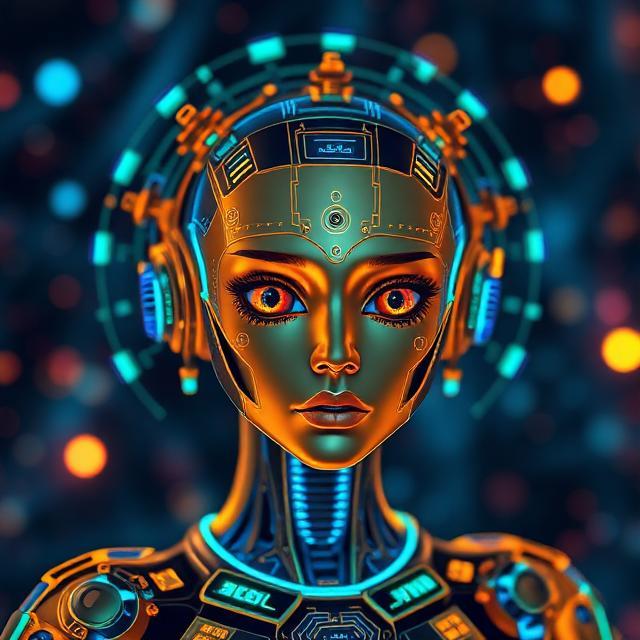
Artificial intelligence has transformed the way people create and use digital images. In the past, creating professional visuals required advanced design skills, expensive software, photography equipment, and hours of manual work. Today, AI image generation allows anyone to create detailed and high-quality images by simply describing their ideas through text prompts.
From realistic portraits and product visuals to marketing graphics and creative artwork, artificial intelligence has made image creation faster, easier, and more accessible. Businesses, designers, marketers, and content creators are using AI image generator tools to produce engaging visuals for websites, advertisements, social media platforms, and digital campaigns.
In 2026, AI image technology has become more advanced than ever. Modern AI systems can understand complex instructions, create realistic details, generate multiple styles, and edit existing images with impressive accuracy.
This guide explains what AI image generation is, how it works, its benefits, and how businesses and creators can use AI tools to create professional-quality images.
AI image generation is a technology that uses artificial intelligence algorithms to create new images from text descriptions, reference images, or existing visual data.
Instead of manually drawing or editing an image, users can provide instructions, and the AI system generates a visual based on those details.
For example, a user can write:
"A modern luxury office with natural lighting, plants, and minimalist furniture in realistic photography style."
The AI analyzes the prompt and creates an image that matches the description.
AI image generation uses advanced technologies such as:
Machine learning
Deep neural networks
Generative AI models
Natural language processing
Computer vision
These technologies help AI systems understand visual patterns and create realistic images.
AI image generation may seem simple from a user's perspective, but several complex processes happen behind the scenes.
The first step begins when a user enters a text description. The AI system analyzes the words, identifies important details, and understands the requested style.
For example, a prompt may include:
Subject of the image
Colors
Environment
Lighting
Art style
Camera angle
Level of detail
The AI converts these instructions into information that the image model can understand.
After understanding the prompt, the AI model processes millions of learned patterns from training data.
The system has studied different types of images, including:
Objects
People
Landscapes
Textures
Colors
Artistic styles
This knowledge helps the AI predict how the requested image should look.
The AI generates a completely new image based on the user's instructions.
Modern AI models can create:
Realistic photographs
Digital paintings
Illustrations
Product designs
3D-style images
Marketing visuals
Users can also modify the generated image by changing the prompt or applying editing features.
AI image creation technology can produce different types of visuals depending on user requirements.
Text-to-image generation is the most common form of AI image creation. Users provide a written description, and the AI creates an image based on that text.
Example:
"A golden retriever wearing sunglasses on a beach during sunset."
The AI generates an image matching the description.
Image-to-image AI tools allow users to transform existing images into new styles or variations.
Examples include:
Changing image backgrounds
Improving image quality
Converting photos into artwork
Creating different styles
Many AI platforms now include editing features that allow users to:
Remove unwanted objects
Expand image backgrounds
Change colors
Enhance details
Replace elements
Several powerful AI image generator tools are available for creating professional visuals.
Midjourney is one of the most popular AI image generation platforms. It is known for creating highly detailed and artistic images.
It is widely used by:
Digital artists
Designers
Content creators
Creative professionals
Realistic image creation
Artistic styles
High-resolution outputs
Creative customization
DALL-E is an advanced AI image generator that creates images from natural language descriptions.
It can generate and edit images based on detailed user instructions.
Text-to-image generation
Image variations
Object editing
Creative designs
Adobe Firefly combines AI technology with professional design tools. It allows users to create and edit images while maintaining creative control.
Generative fill
AI-powered editing
Text effects
Professional workflows
Canva's AI image tool helps users create visuals directly inside its design platform.
It is useful for:
Social media posts
Presentations
Marketing graphics
Business content
Easy interface
Templates
Quick customization
AI-generated visuals
Stable Diffusion is an open-source AI model that provides advanced customization options.
It is popular among developers and experienced creators who want more control over image generation.
Custom AI models
Flexible settings
High-quality images
Open-source technology
Traditional image creation can take significant time. AI tools generate visuals within seconds, helping users complete projects faster.
Businesses can save money by creating marketing visuals without hiring photographers or designers for every project.
AI provides unlimited creative possibilities by generating different concepts, styles, and ideas.
Companies need constant visual content for websites, advertisements, and social media. AI tools help produce images at scale.
People without professional design skills can create impressive visuals using simple instructions.
Businesses use AI-generated images for:
Advertisements
Social media campaigns
Promotional materials
Email marketing
Online stores use AI tools to create:
Product backgrounds
Lifestyle images
Promotional visuals
Product concepts
AI-generated images help websites look more attractive and professional.
Companies use AI visuals for:
Logos
Brand graphics
Presentation designs
Marketing materials
Better prompts usually create better results. Include details about:
Subject
Style
Colors
Environment
Lighting
Try different artistic styles and descriptions to discover unique results.
Many AI platforms allow reference images to improve accuracy and consistency.
Use AI editing features to refine generated images and achieve better outcomes.
Although AI image technology provides many benefits, it also has some challenges.
Sometimes AI may create incorrect details, especially with complex objects or human features.
Users should understand image ownership and licensing rules before using AI-generated content commercially.
AI generates images based on learned patterns, but human creativity and decision-making remain important.
The future of AI image generation is expected to bring even more advanced capabilities. AI systems will continue improving in areas such as:
Realistic image creation
Personalized designs
Faster processing
AI video generation
Advanced editing
Businesses and creators will increasingly use AI tools as part of their creative workflows.
AI image generation is a technology that uses artificial intelligence to create images from text prompts, reference images, or user instructions.
AI image generator tools analyze user prompts and use trained AI models to create visuals based on learned patterns and data.
Yes, modern AI tools can create highly realistic images with detailed textures, lighting, and natural-looking elements.
Yes, businesses use AI images for marketing, advertising, websites, product visuals, and social media content.
Popular tools include Midjourney, DALL-E, Adobe Firefly, Canva AI Image Generator, and Stable Diffusion.
AI image generation has changed the way people create digital visuals by making professional image creation faster, easier, and more affordable. With advanced AI image generator tools, users can transform simple ideas into high-quality images within seconds.
From designers and marketers to businesses and content creators, AI technology provides powerful opportunities for creativity and productivity. As artificial intelligence continues to evolve in 2026, AI image generation will become an even more essential tool for creating innovative and engaging visual content.